
Wanderlog App Review: The Best Travel Planner for Itineraries?

The Art of Living in Turkey contains affiliate links and is a member of the Amazon Services LLC Associates Program. If you make a purchase using one of these Amazon links, I may receive compensation at no extra cost to you. See my Disclaimers for more information.
If you are looking for a travel planning app that keeps everything organized in one place, the Wanderlog app is one of the most useful tools available today.
Wanderlog is a powerful travel itinerary planner that helps you organize trips, map daily routes, track expenses, and collaborate with friends or family. It works on both desktop and mobile, and the free version includes many features that most travelers will find more than enough for planning a trip.
I started using Wanderlog while planning a trip to the United States, and it quickly became one of my favorite travel tools. Instead of juggling notes, booking confirmations, and Google Maps lists, everything was stored neatly in one place.
One of the features that first caught my attention was the ability to import flight and hotel reservations directly into the app. Suddenly, my itinerary, reservations, and trip ideas were all organized automatically, which saved a lot of time.
In this Wanderlog review, I will walk you through:
• The key features of the Wanderlog travel planner
• What you get with the free and Pro versions
• How it compares to competitors like TripIt
• Whether the app is actually worth using for planning your trips
By the end of this review, you should have a clear idea of whether Wanderlog is the right travel planner for your next trip.
Wanderlog App Overview
Wanderlog is one of the most useful travel itinerary planner apps available for organizing trips, mapping routes, and tracking travel expenses.
Best for: Travelers who want to organize itineraries, maps, reservations, and expenses in one place
Free version: Yes
Pro version: $49.99/year
Platforms: Web, iOS, Android
Main features: itinerary planning, maps, expense tracking, collaboration
The Wanderlog App was established in 2019, and at its core, it is designed to be the ultimate user-friendly travel itinerary planner, catering to the needs of modern travelers seeking a streamlined and efficient way to organize their trips.
Wanderlog is accessible from anywhere with a comprehensive web platform and a convenient mobile app. This makes it a versatile tool for planning wherever you are.
Its mission is straightforward yet ambitious: to simplify the complexities of travel planning, transforming what can often be a daunting task into an enjoyable part of the travel experience.
This makes it a helpful tool for people who travel frequently, plan group trips, or like to keep their itineraries organized in one place. Let’s look at its key features.
Key Features of the Wanderlog Travel Planner
This app brings a suite of impressive features designed to cater to every aspect of trip planning. You may be thinking yeah but I bet on the free version you can’t do much…
Not true. I used the free version for a while before getting the Pro. But we will talk about the few upgrades that come with Pro and why I think they are helpful.
Collaborative Planning
One of the standout features of Wanderlog is its collaborative planning capability. Taking a trip with friends? Then this will help keep you all on the same page!
This feature allows users to plan trips with friends, family, or fellow travelers in real time, making it easy to share ideas, itineraries, and tasks.
Whether deciding on which attractions to visit or where to dine, collaboration ensures everyone’s preferences are considered, making the trip enjoyable for all involved.
What’s even more is when you put expenses in, you can choose who paid, if you split the cost or not, as well as let it settle the bill at the end of the trip. I have been using Splitwise for years when traveling with friends but to have the same type of feature built in is glorious.
Seamless Itinerary Creation
Creating an itinerary with Wanderlog is also a breeze. The app guides you through the process step-by-step, allowing you to add flights, accommodations, activities, and more with just a few taps.
It organizes everything in a neat, chronological order, giving you a clear overview of your travel plans at a glance. This saves time and ensures no detail is overlooked.
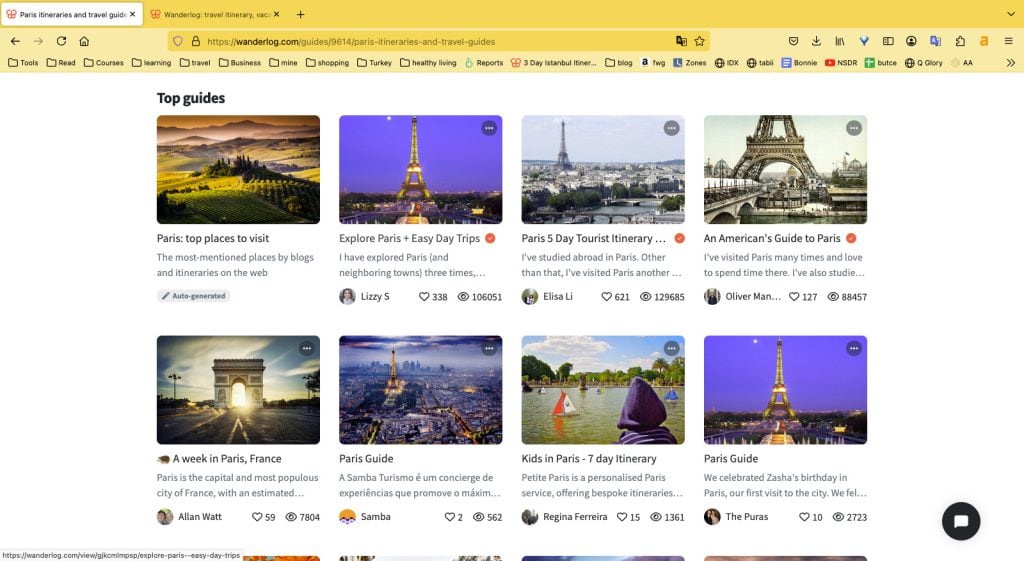
They also have some great city guides to help you come up with ideas for things if you are new to the destination. You can see other people’s guides and make notes of things you don’t want to forget to do, see, or look up.
You can create a list of places to see and then add them to your itinerary below.
Import Flight, Hotel, and Car Reservations
This also allows you to import the information for purchases which is part of the expense tracking but also part of keeping all your times and reservations together.
This was actually the feature that first drew me to the app. I hate having to have all these papers or even an Apple Note with all the details and having to sort through to find what I want.
With Wanderlog it is formatted so I can find what I need easily and quickly. I know it is all correct because it has been imported with the information that was sent on the reservation. Yes, please!
Expense Tracking
Keeping track of travel expenses can be a daunting task, but Wanderlog simplifies this aspect of travel planning, too. The app provides users with tools to log expenses, set budgets, and monitor spending throughout the trip.
This feature helps not only avoid overspending but also make more informed financial decisions while traveling. Well, that is if you actually put the money you have spent in the app.
Discover
Don’t know where you want to go yet? With Wanderlog, you can check out their extensive guides and resource list. This allows you to explore both Wanderlog’s guides and itineraries created by other travelers.
You can explore destinations by city, weather, or category. There is a wealth of information that makes planning fun!
Pro Features
If I can use the free version of something, I will. I’m not cheap but if I don’t need something I don’t want to spend the money on it.
But with these pro features, it seems worth the headache it saves me especially since I typically take more than a couple of trips a year. Then you add in the hassle it saves when there is a group and it feels like a no-brainer to me.
Offline Access
In an era where being constantly online is almost a necessity, Wanderlog ensures that your travel plans are always within reach, even without an internet connection, which is especially helpful when landing in a foreign country.
The offline access feature allows travelers to download their itineraries, maps, and other critical travel information to use when Wi-Fi or data is unavailable.
Export to Google Maps
This is one of those pro options that got me. I love Google Maps. I use it daily to get around Istanbul. I actually don’t know what I would do without it.
This feature allows you to take your itinerary for the day and export it to Google Maps so that you have a route to take. When you pair it with the next pro feature, you’ll understand my excitement.
Optimize your route
I hate backtracking. I hate wasting time when I could have spent that time elsewhere and really loved it!
This feature allows you to take all the things you want to do in a day and helps you optimize the day’s plans so that you aren’t wasting time going back and forth between places. Brilliant!
So you take your optimized plan and then export it to Google Maps and you’re off to the races! Unfortunately it does break down if there is an ocean, or the Bosphorus, separating places. Otherwise, the optimize is great for helping you not backtrack and waste precious time.
Auto import from Gmail
You can also allow Wanderlog to have access to scan your Gmail account for things like flights, cars, and hotels and they will automatically import to your account.
To be honest, this makes me nervous so I haven’t done it but for those who don’t care or really just want to save time, this is an amazing feature to help you do just that, save time.
Special deals
Wanderlog also provides special flight and car rental deals with the Pro version. If I am honest, even with their deals, I find better prices on DiscoverCars.com, which is what I always use when booking a car. You can, however, use Wanderlog to organize your rental car stops after booking through DiscoverCars.
How to Export Wanderlog to Google Maps
One of the most useful Pro features in the Wanderlog app is the ability to export your itinerary directly to Google Maps. This makes navigating your day much easier since you do not need to manually enter each destination.
To export your route from Wanderlog to Google Maps, follow these steps:
- Open your trip inside the Wanderlog app
- Select the specific day of your itinerary
- Click the Export to Google Maps option
- Google Maps will automatically open with your route and stops
Once exported, you can use Google Maps to navigate between each stop in order. This is especially helpful when exploring a new city because it prevents unnecessary backtracking and keeps your day organized.
I personally love this feature when planning trips in places like Istanbul, where attractions, restaurants, and neighborhoods are spread out across the city.
Is Wanderlog Free?
Wanderlog offers a generous free version that includes most of the core planning tools. Many travelers will find the free plan more than enough for organizing trips, especially if they do not need offline access or route optimization.
Freemium
$0
You can’t go wrong with adding this app to manage your trips.
Basic includes:
Pro
$49.99/year
You can even try it out first with their free trial to make sure it is just what you need.
Pro includes:
As you can see, the key features of the Wanderlog App — collaborative planning, seamless itinerary creation, and expense tracking — are thoughtfully designed to address the common challenges faced by travelers.
Then you add in the pro features like offline access, exporting to Google Maps, and optimizing your route and it makes a no-brainer for me.
Plus the interface is incredibly user-friendly. Even though it was a new program to me, it took me no time at all to feel comfortable navigating the platform. When I did have questions, I just checked their extensive FAQ page for help.
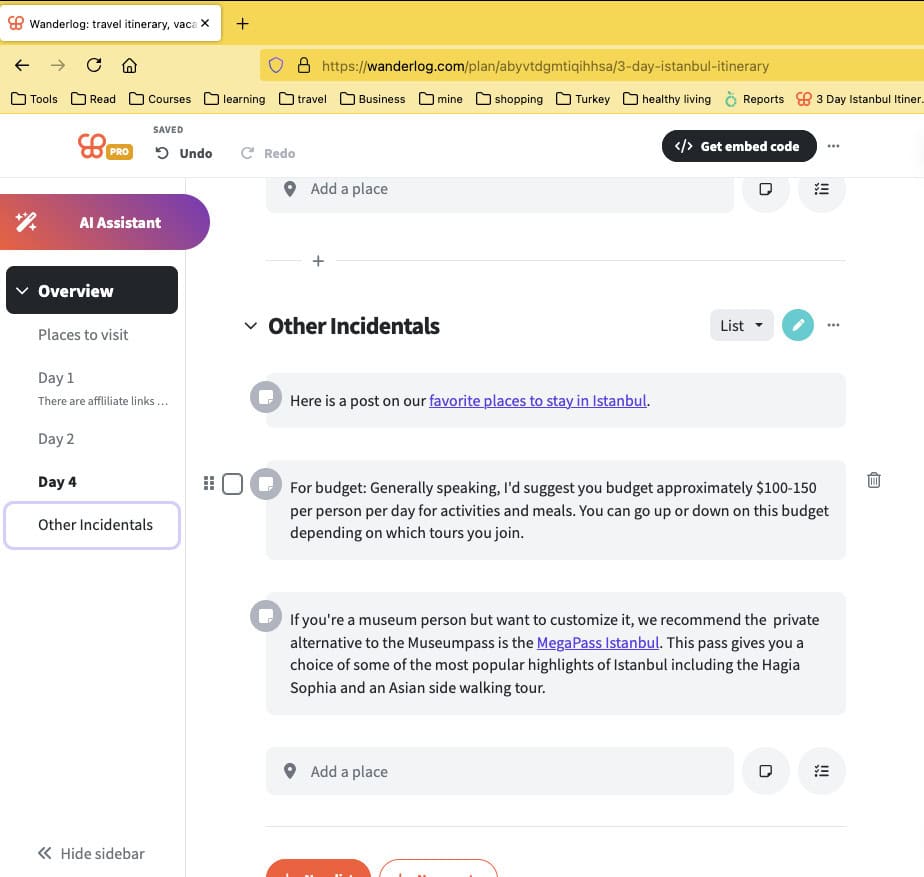
You can add all kinds of things that you need to make your trip smooth. They can be thoughts you want to save or places you want to check out. The options are endless.
| Feature | Free Version | Pro Version |
|---|---|---|
| Trip planning | ✔ | ✔ |
| Collaborative planning | ✔ | ✔ |
| Expense tracking | ✔ | ✔ |
| Offline access | ✘ | ✔ |
| Export to Google Maps | ✘ | ✔ |
| Route optimization | ✘ | ✔ |
Wanderlog Discount Code
Wanderlog occasionally offers promotions for the Pro plan. If a discount code is available, you’ll usually see it during checkout or through seasonal promotions.
If you are considering upgrading, it is worth checking for promotions since Wanderlog occasionally offers discounts on annual plans.
There is currently no referral or affiliate program. I am recommending this app because it has truly been helpful.
Why Choose Wanderlog for Your Travel Planner Needs?
When it comes to travel planning apps, what sets Wanderlog apart is not just all its features, but how these elements come together so seamlessly and give a user-friendly experience.
User-Friendly Interface
Navigating through Wanderlog is so incredibly easy. The app’s design is intuitive, allowing you to quickly find what you’re looking for without a steep learning curve.
Whether you’re plotting out your next trip or revisiting plans for an upcoming adventure, every feature is just a few taps away. Plus, there are lots of resources for planning to make life easier.
All-in-One Hub
Wanderlog serves as a centralized platform for all your travel planning needs. From drafting detailed itineraries to tracking expenses, everything you need is consolidated in one place.
This eliminates the need for using multiple apps or tools, streamlining the planning process and making information management hassle-free. This is especially helpful for those of you who are administratively challenged.
Visual Mapping
Another standout feature is the use of visual mapping. The app integrates maps to not only help you plan your route but also to discover attractions, restaurants, and other points of interest along the way.
This interactive aspect enhances the planning process, making it both informative and enjoyable. With the pro version you can link to not only places on the map but also add links that would be helpful on your trip.
Time-Saving Features
It also comes equipped with a variety of tools designed to save time. The seamless itinerary creation tool allows for quick entry of destinations, while the collaborative planning feature ensures that everyone on the trip can contribute and stay updated without back-and-forth communication.
Additionally, the offline access and integrated expense tracking further streamline the planning experience.
And if you’re crunched for time, you can check itineraries that other people have made public. This cuts down on your research time or perhaps just gives you a place to start from.
Planning a Trip to Turkey with Wanderlog
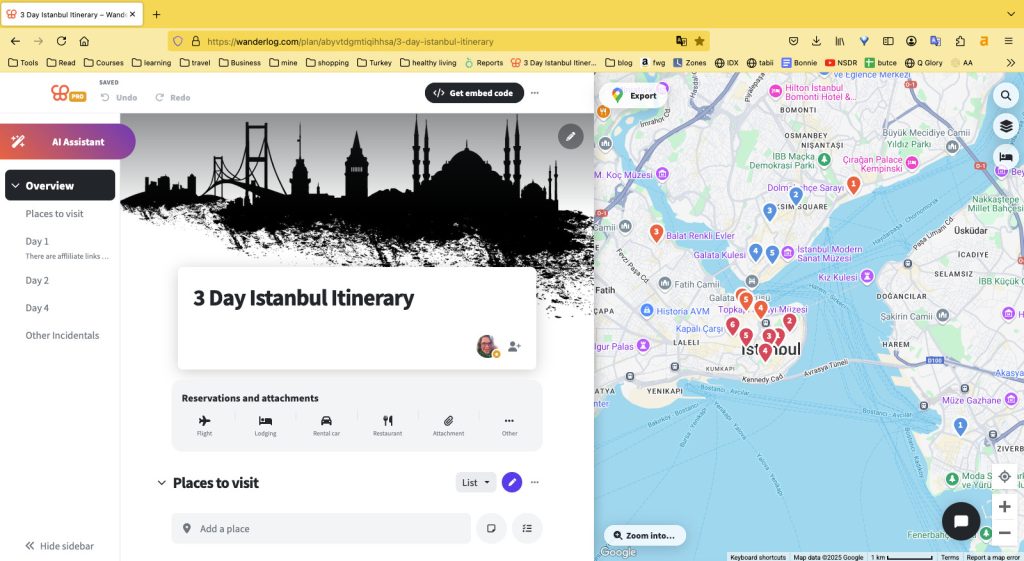
To understand Wanderlog’s practical application, consider planning a trip to Turkey in the app to get a feel. Below are a few screenshots from our 3 day Istanbul Itinerary.
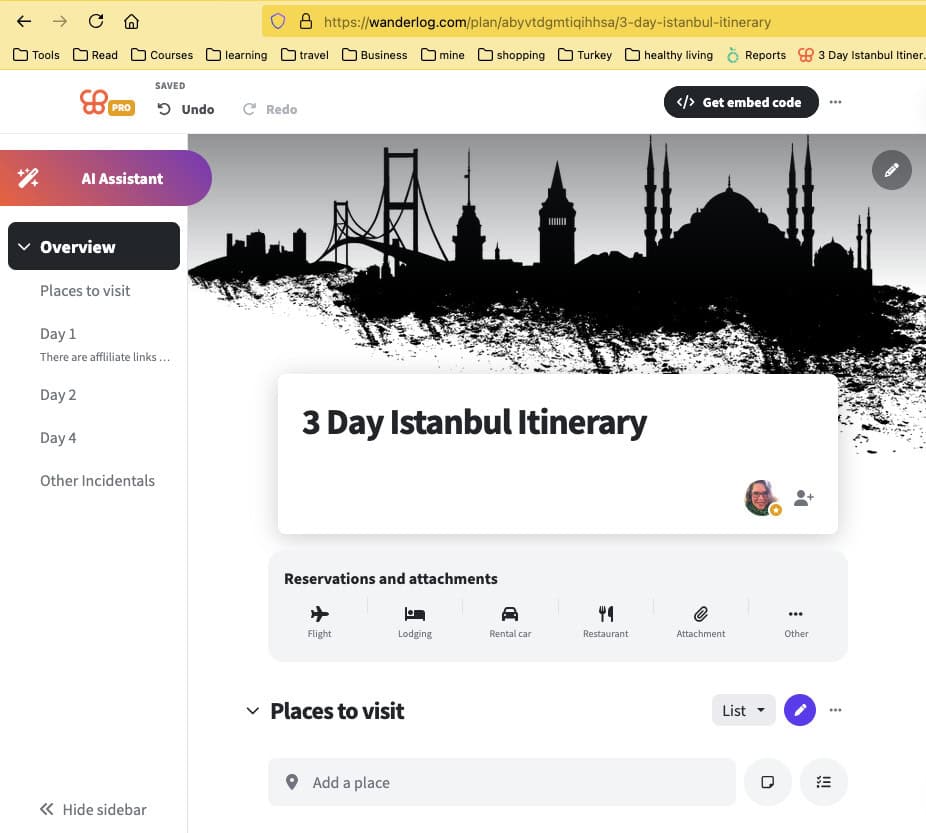
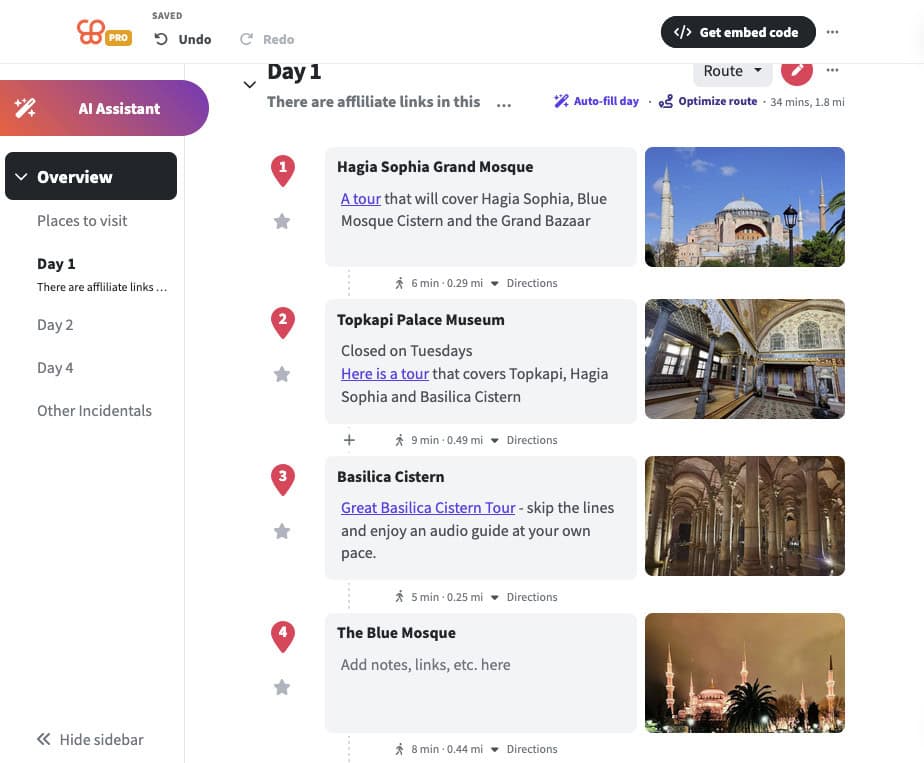
Here you can see that there are days on the left. They are either routes or lists. You can drag them around to put them in the order you want them in.
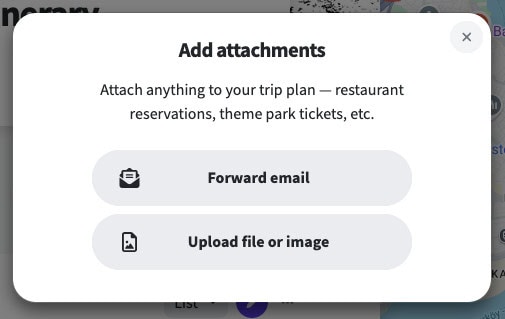
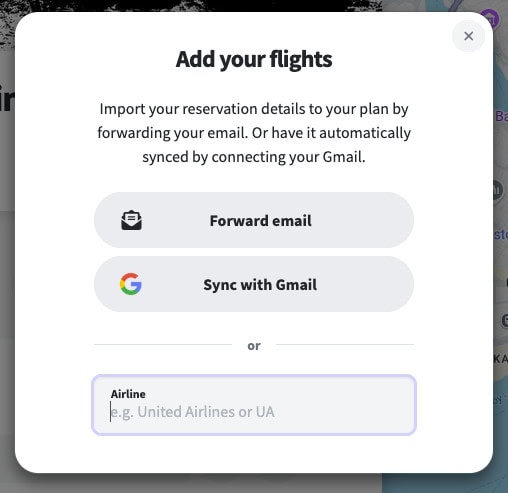
These are screenshots of the options to add information to your trip.
My Tips for Maximizing Wanderlog
To get the most out of Wanderlog, here are a few advanced tips:
- Leverage the offline access feature, especially crucial for international travel where internet connectivity may be intermittent or before you have purchased your local SIM card/activated your eSIM.
- Make sure you put everything in there as you go. If you don’t have the pro version, just get in the habit of purchasing your flights and immediately importing the information to Wanderlog or forwarding the email to the app.
- Utilize the built-in budgeting tool to keep a close eye on your travel expenses, making real-time adjustments to stay within budget as well as split the costs correctly between the crew or for the family.
- Create a map of all the places you want to go in case you have extra time and want to add something else to the itinerary.
- I find it helpful to add links to websites or information that may be helpful while I am on the trip. I keep a list at the bottom of other things that are helpful.
These tips not only enhance your travel planning experience but also ensure that your trip goes as smoothly as possible from start to finish.
Wanderlog vs. Tripit
While Wanderlog offers an innovative approach to travel planning, it’s constructive to compare it with other tools in the market, such as Tripit, the other leader in the industry.
Overview of Tripit
Tripit was started in 2012 and so it has been around a little longer.
It is a widely used travel organizer that automates itinerary creation by pulling information directly from emails, consolidating flights, hotel bookings, and rental car reservations into a single timeline.
Its key features include automatic syncing of travel plans, sharing capabilities, and real-time alerts (which to be fair is quite cool).
Comparing Features
Both Wanderlog and Tripit excel in streamlining travel arrangements, but they approach travel planning differently.
Wanderlog’s strength lies in its interactive planning features such as collaborative planning, visual mapping, and extensive offline access.
Meanwhile, Tripit’s automated itinerary construction from email confirmations offers a clear advantage for those who prefer a more hands-off approach in consolidating their travel details.
Strengths and Weaknesses
Tripit’s automated itinerary creation saves time and reduces the effort in managing bookings, making it highly efficient for business travelers or individuals with straightforward trip planning needs.
However, it might not cater as well to those who seek the detailed customization and interactive mapping that Wanderlog provides.
I also found Tripit to be more clunky for lack of a better word. I tried it a couple of years ago and just couldn’t get into it but from the moment I opened the Wanderlog app, I was sold!
The choice between Wanderlog and Tripit ultimately depends on the traveler’s preferences.
Wanderlog is ideal for travelers seeking interactive and collaborative planning tools, while Tripit suits those who prefer convenience and automation in organizing travel details.
Both are powerful tools in their own right, significantly enhancing the travel planning experience.

Wanderlog App FAQs
Is Wanderlog free?
Yes. Wanderlog offers a free version that includes itinerary planning, collaboration tools, expense tracking, and map integration. A paid Pro version adds features like offline access, route optimization, and exporting routes to Google Maps.
Does Wanderlog work offline?
Yes, but only with the Pro version. Offline access allows you to download your itinerary and maps so you can view them without an internet connection.
Can Wanderlog export to Google Maps?
Yes. With the Pro version you can export a daily itinerary directly to Google Maps, which allows you to navigate between stops without entering each destination manually.
Is Wanderlog better than TripIt?
It depends on how you plan trips. Wanderlog is better for interactive planning, maps, and collaboration, while TripIt focuses more on automatically organizing reservations from email confirmations.
Is the Wanderlog App Worth It?
If you like keeping your travel plans organized in one place, the Wanderlog app is one of the best travel itinerary planners available right now.
Between the collaborative planning tools, built-in maps, expense tracking, and easy itinerary building, it simplifies the entire trip planning process. Instead of juggling notes, emails, and different apps, everything can live inside a single organized itinerary.
For most travelers, the free version will be more than enough to plan and manage trips. However, frequent travelers may find the Pro features like offline access, route optimization, and Google Maps export especially useful.
After using Wanderlog for my own trips, it has become one of the tools I rely on most when planning travel.
If you enjoy organizing your trips ahead of time, Wanderlog is definitely worth trying.
Planning a trip to Turkey?
- Don’t miss out on the best pestamels! They are the perfect gift.
- Here is a new post on things to do this summer in Istanbul
- Check out our 7-day Istanbul itinerary
- Foreign Women in Turkey: Pat Yale – an interview with a renowned writer
- Turkey’s dialing code and all you need to know about phone numbers
Turkey Vacation Basics
When I plan a trip these are the websites I use. I hope they help you plan your next adventure as well!
FLIGHTS: I am a huge fan of Skyscanner.
VISAS: You can use the free e-visa portal here but for a few extra dollars you can use iVisa and someone else will handle any issues that may come up.
E-SIM: When I traveled to SE Asia I discovered e-sims and I’m never going back. Airalo has been easy and cheap!
TRAVEL INSURANCE: I use TravelInsurance.com for my trips abroad.
CAR RENTAL: I have loved working with Discover Cars when I rent cars in country.
AIRPORT TRANSFERS: I have used these transfers many times and they are always great. If you’d like more options, I also recommend GetTransfers.com as they allow you to compare companies.
ACCOMMODATION: Find the best Turkey hotel deals on Booking.com.
CITY TOURS & DAY TRIPS: You can browse GetYourGuide’s website to find just the tour you’re looking for! We also recommend the MegaPass for major cities.
